New customer? Take 15% off your first order with code TRYGP15
Custom Quote

Welcome back

Log in to track orders, reorder in a click, and save your addresses.

Forgot password?
New to Greenerprinter?
Greenerprinter
Custom Quote
1-800-655-5833

Mailing


Download a Greenerprinter Indicia for your mailing project

If you'll be mailing your job with Greenerprinter, download the appropriate indicia below and place it on your artwork. If you qualify for a non-profit rate, please contact a customer service representative for our non-profit indicia.

First Class Indicia

Download

Standard Indicia

Download


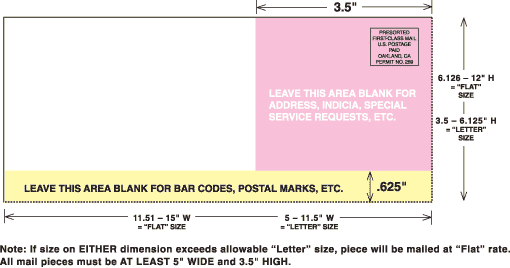
Download the Greenerprinter Mailpiece Design Template

If you are mailing a custom-size piece, download this "mailpiece design" template to insure that your artwork is set up for proper bulk-mail automation. For standard-sized items (postcards, brochures), please visit our TEMPLATES page. Standard templates will have this information preformatted.

Mailpiece Design Template

Download USPS Authorization Form

Download USPS Non-Profit Authorization Form to restister with USPS, so you can mail through the non-profit option. 

DOWNLOAD 

Greenerprinter Mailing List Template

Please make sure that address lists for items that we will be mailing include the following information:

  • First Name
  • Last Name
  • Street Address ("Address 1")
  • Apartment or Suite number ("Address 2")
  • City
  • State
  • Zip (5-digit or 5-plus-4)

If you are using the list-building tool on our site to create a list, it will automatically be sent to us in the correct format and you may disregard these instructions.

mailing list template
We accept tab-delimited text files (.txt), Excel files (.xls), or comma-delimited text files (.csv). If you are sending a csv file, please remove commas from within any addresses, as this will "shift" everything in the database.

After you've completed your mailing list, please upload the file just as you would any other files for your project. If your order has already been started, log on to your account, click "Account Details" and then select the job. Next, click the button that reads "Upload Additional Files." This will take you to a page where you can upload your mailing list. You can also email your list to csr@greenerprinter.com. Please indicate the item number for the order in your email.


DOWNLOAD MAILING LIST TEMPLATE